MODx
MODx is “100% buzzword compliant” meaning that it was created to immediately work with all sorts of techie things like AJAX, Javascript libraries and all that sorts of goodness. It’s creators call it a “Content Management Framework” meaning that it can be used for a whole lot more than your typical static brochure site.


Current Version: 2.0.0 / 1.0.4
Cost: Free
Development: Community
Hosting: Own Server
Source: Open Source
License: GNU GPL
Programming: PHP
Database: MySQL
Our Impressions:
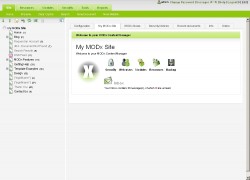
MODx is feature-rich, it’s built to use all sorts of the newest technologies (like AJAX) and a lot of developers love it for that. The system is easy to navigate and find your way around with the left side menu that pops open with pages. It can manage files, weblinks, and pages with ease along with nice features like a site backup.
As a new user it can be a little overwhelming because every new page you create has a hundred boxes that could be filled out or checked. At times, raw code shows up in the backend that may also be confusing if you aren’t a programmer.


Helpful Links:
- MODx Content Management System Home to the documentation and forums for MODx
- MODx Twitter Page Follow their updates
- Suggest a Link
Related Site News:
User Reviews: Submit Your Own
You must be logged in to post a comment.
Voting has been open for this CMS since Wednesday, January 14th, 2009. There are a total of 7 Reviews for this CMS. You can follow future reviews through the RSS feed if you'd like.

Review by flashjb September 11th, 2012 5:32 pm

Review by Dan June 13th, 2012 11:23 am
Strengths: Good CMS if you want to embed PHP into your designs. They provide two major types of hooks, called “chunks” and “snippets” that allow you to put in your own custom features.
There are also a large number of add-ons that can address just about anything you need, including a complete blog implementation.
Modx is easy to install and relatively quick to get up and running.
Weaknesses: Modx is way overhyped. At first, I was very active in the Modx community, but as I developed more and more sites with it, I became encreasingly disappointed. Here are some of my reasons:
1. Latest version, “Revolution” has lots of bugs and inconsistencies. For example, the cache will sometimes fail, giving you nothing but a white screen. You need to get root access to the server and manually jettison the cache to bring the site back. This is a show-stopper for me. It’s like having the Sword of Damocles over my head … I just have to continue checking all my clients’ sites to make sure they’re not suffering from the “White Screen of Death.”
2. Very poor documentation. For example, after implementing their “Login” add-on, you’re left with documentation that provides details on how to set up the login forms, but absolutely NOTHING about what outputs (placeholders) are available after submitting the login. So if you want to create a message like, “Welcome back Joe” after Joe has logged in, you have to dig, dig, dig through the online forums to find out how to get the first name of the guy that just logged in. In the end, you often have to make PHP calls like, modx->getResults[‘name’]. Don’t do this on a web page, however, because you’re prevented from putting PHP directly on a page. Instead, you have to do it within a snippet, and then reference the snippet on a web page like this: [[!getUserInfo&type=name]]. Sheesh!
3. Ease of use. I put several of my clients into Modx and almost immediately wish I hadn’t. The management back-end is dangerous for people (like my clients) that don’t know what they’re doing. You end up having to create your own easy-to-use pseudo back-end so that your clients don’t accidentally step on a land mine and blow up the entire site.
4. Security. Nice features for creating user groups, privileges, etc., but almost no explanation of the terms or any tutorials whatsoever. Every time I create a user group, I end up having to go back again and again to fix some wonky permission structure.
5. The Modx team is just downright arrogant. I used to be a contributing member, giving them $50-per-month. I didn’t even ask them to list my website. I just figured that if I’m going to make money with their software, I ought to pay them. Then they decided to change the terms and canceled my membership. Instead, they wanted me to join an even more “exclusive” club, which would have cost me more. After contributing $500+ dollars, I felt insulted. This alone has motivated me to move my clients out of Modx.
6. The Modx team emphasizes that you don’t need to know PHP to use Modx. That’s disingenuous. I don’t know how many people they fool with that claim, but it’s blatently false.

Review by Maxim February 14th, 2011 6:54 am
Strengths: ModX Revolution CMS may be well designed, but it is done very badly.
Maybe just one good feature is relative easy design. Everything else does not deserve mention.
Weaknesses: SLOW, SLOW, SLOW and SLOW administration, based on Ext JS.
Lots of bugs in CMS.
I have to agree with previous comments. Well noticed:
time wasting community
a bunch of arrogant core developers
After several months of use, I can feel like a big failure.

Review by Pete November 18th, 2010 4:50 am
Strengths: good marketing
Weaknesses: MODX CMS – the best CMS to destroy your sites!
Take:
• a bunch of arrogant core developers
• create anything you like
• call it the most advanced CMS
Mix it with:
• great sounding marketing slogans
• nice looking wrapping
• empty promises
• time wasting community
Offer it: FOR FREE
and you get?
A totally stuffed up code disaster that would bury itself in the root, turn itself immortal, crashes your server, let’s you delete – whatever you have on the server – just to get a chance to get rid of the FREE disaster
Welcome to MODX CMS – YOUR HELL OF EXPERIENCE AND GREATEST NIGHTMARE!
Never complain, it’s a community driven, god-fearing CMS. Nobody forces you to use it. It’s all your problem if you do! Go to hell, MODx!

Review by Sebastian April 24th, 2010 7:29 am
Strengths: Excellent CMS, the hierarchical structure for content that it uses is just so logical, very easy to understand from the beginning. I have used Joomla, ExpressionEngine and ModX. And ModX is by far the easiest to understand and use.
It has a big community with lots of free plug-ins. The core installation comes with an html editor that is fantastic, clients love this, you can edit pages directly in context as long as you are logged in.
Weaknesses: The biggest weakness is the lack of important feature in the core installation.
As many common things are not part of the core installation you will need to rely on the plug-ins (e.g. mailing lists). This is good and bad. Good because there are many plug-in choices but bad because many plug-ins are half done and a bit difficult to implement.
The documentation for some plug-ins is not very good as well, but is better that some paid options (i.e. ExpressionEngine)

Review by Ignaty Nikulin October 28th, 2009 10:02 am
Strengths: Big community. Mega easy for designers. Ditto is a rockstar. Many modules (Starting from website redesign, now they have modeule database). Strong Web Standards Support.
Weaknesses: None found afrer 1.0 Release.

Review by Everett October 16th, 2009 11:11 pm
Strengths: Templating. Hands down, MODx is one of the easiest CMS’s for designers to work with. Many CMS’s operate within a rigid box, and they offer only minimal settings for designers to tweak the look and appearance. MODx is different — it lets designers take existing HTML and CSS and then you can pop in a few simple placeholders to get the CMS functionality (e.g. [*pagetitle*]). *ANY* existing HTML can be ported to MODx quickly, and it’s trivial to give each page its own look and feel.
MODx is an excellent choice if you want to add CMS functionality to a static site.
MODx makes it easy for developers to add their own PHP scripts.
MODx has few limitations — most everything is possible.
Weaknesses: It’s a small dev team, and sometimes documentation is limited. The number of 3rd party additions is limited too, and MODx may not be the ideal choice for certain applications. Although most everything is possible in MODx, not everything is practical.
Strengths: MODx makes it easy for developers to add their own scripts,
MODx is very practicle for little website with custom dynamics contents.
It’s a perfect base for multi-platform and multi-context websites
Not easy to understand in beginning, but very usefull for everything needed
Support is professional and reactive
Community seems to be old aged, but qualified and knows the subject 😉
Weaknesses: You need to be a developper to manage to understand all capabilities.
It could be sometimes difficult to go ahead after tutorials
Tutorials are sometimes bad explained and poor documentation.
Bugs are sometimes blocking, and understandables
The white screen crash can make you cry a long time the first time